Requirement
- Apache Tomcat 5.0
- JDK 1.5
Step-by-step
- Check whether Java is installed and Configured in your path.
- Create .keystore file
How to Check whether Java is installed and Configured in the Path?
Open a terminal, and type as java
If you get the output as ,
-bash: java: command not found
this means that either Java has not been installed or Java is not added in the path.
How to configure Java in the Linux Path?
1. Download the latest Sun JDK from http://www.oracle.com/technetwork/java/javase/downloads/index.html
2. If you are downloading for Linux, probably you need to download .bin file.
Now install the bin file
3. Now login as root in your Linux System
Edit the file /root/.bashrc
4. Now add the following commands to it
export PATH=$PATH:/opt/JDK_VERSION/bin:
5. Now save the file
6. Then in the Terminal type the following command.
source /root/.bashrc
7. Now enter the command as
java -version
in the Terminal.You should get the following similar output,
java version "1.6.0_20"
Java(TM) SE Runtime Environment (build 1.6.0_20-b02)
Java HotSpot(TM) Server VM (build 16.3-b01, mixed mode)
Create Key Store
- Type “keytool –genkey –alias tomcat –keyalg RSA and press enter
- Where tomcat is an alias name and RSA is a key algorithm.
- Type your password for the keystore. (Default password is: changeit). In this example, I’ll use password as “password�?.
- Enter general information about this Certificate. The example is the image below. In the last line, Enter key password for (tomcat) should be the same as you enter before.
Note that this information will be displayed to users who attempt to access a secure page.
The file .keystore will be created on your account (/root/.keystore)
Configure Tomcat
- pen server.xml in Tomcat\conf folder. (Default path is: /opt/apache-tomcat-5.5.17/conf)
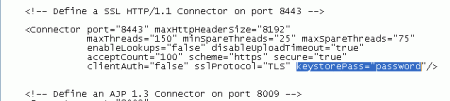
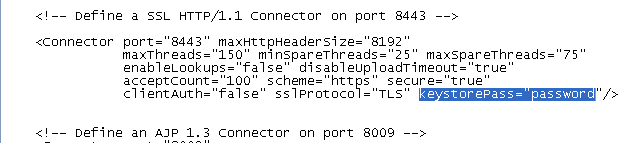
- Uncomment the paragraph below this line
<!-- Define a SSL HTTP/1.1 Connector on port 8443 --> (By removing <!-- and --> tags below the line) - Add new attribute keystorePass=”password” to the Connector element. If you haven’t change keystore’s password, you don’t have to add this attribute.
- Change port to 443 if you want to access a page from https:// without specifies port after hostname.

- Save and restart Apache Tomcat service.
- Test the result
- Open browser and navigate to the Apache Tomcat server with https:// prefix

No comments:
Post a Comment